
IS YOUR BUSINESS REACHING THE RIGHT AUDIENCE?
Blog
7 Ways to Make Your Website More User-Friendly
November 13, 2026
Have you ever visited a website, struggled to find what you were looking for, and eventually decided to leave? Your visitors could be having the same experience on your website.
A good-looking website is a great start, but there is more to it than just appearance. Visitors should be able to find information, move between pages, and complete actions without feeling confused or frustrated.
If you want people to spend more time on your website and make it easier for them to become customers, here are seven things you can work on.
Want Visitors to Enjoy Using Your Website? Start With These 7 Improvements
1. Help Visitors Find Their Way Around
Visitors should be able to find what they need without having to click through several pages.
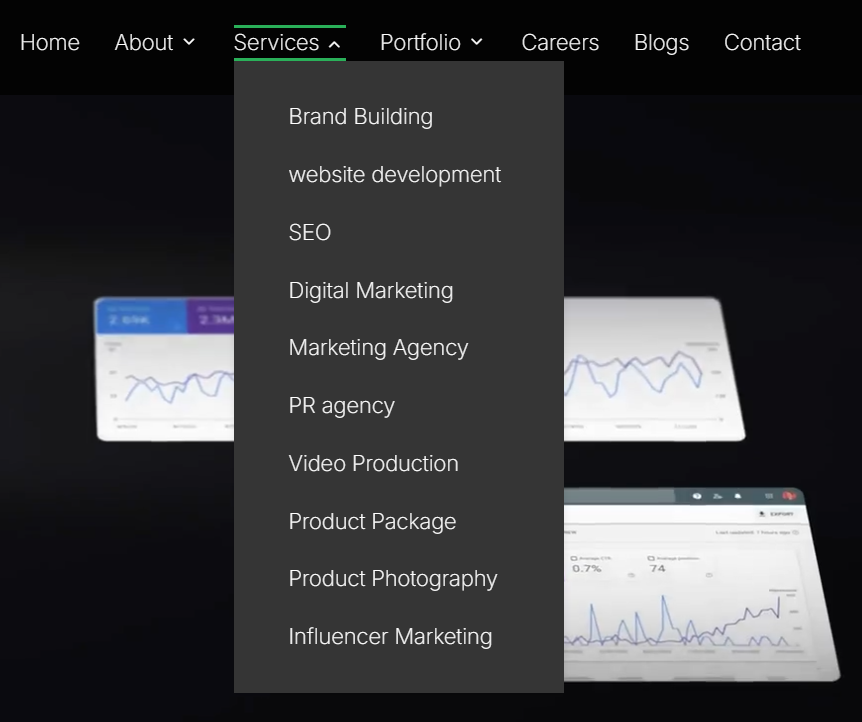
Think of your navigation menu as a little map that helps visitors move around your website. If there are too many options or the labels are confusing, people may struggle to find the information they need.
Keep your menu simple by grouping similar pages together. For example, you could have sections like Home, About Us, Services, Projects, and Contact. Use familiar names so visitors know where to click without having to guess.
You do not need to include every page in your main menu, either. Keep the most important ones visible and organise the rest under suitable categories. If your website has a lot of pages, adding a search function or breadcrumbs can also help visitors find their way around.

2. Give Mobile Visitors a Better Experience
Your website should be just as easy to use on a smartphone as it is on a desktop computer.
Think about how people usually discover businesses online. Someone might come across your business on Instagram, click a link, and visit your website straight from their phone. If they have to zoom in to read the text or struggle to tap a button, there is a good chance they will leave.
This is where responsive design becomes important. Your website should automatically adjust to different screen sizes. Make sure the text is easy to read, images fit the screen properly, and buttons are large enough to tap comfortably.
Do not forget to check your navigation menu on mobile devices, either. Visitors should be able to open it, find the page they need, and move around without accidentally clicking the wrong thing.
3. Do Not Make Visitors Wait for Your Website to Load
A slow website can spoil the browsing experience before visitors even get to see what you offer.
Imagine someone visiting your website to find a service, only to wait several seconds for the page to load. They may simply leave and visit another business instead.
Start by checking your website images. Large, uncompressed images can slow down your pages, so resize and compress them before uploading. Also, remove unnecessary plugins, scripts, and animations that may affect loading speed.
If your website is still slow, your hosting provider or technical setup could be the reason. You can use Google PageSpeed Insights to identify performance issues and find ways to improve your website speed.
4. Make Your Website Content Easier to Read
Visitors should be able to understand what your business offers without having to read through long blocks of text.
Most people visit a website looking for specific information. Make it easy for them to find what they need by using clear headings, short paragraphs, bullet points, and enough spacing between sections.
Keep your language simple and avoid complicated words or technical descriptions. For example, a service page should clearly explain what the service includes, who it is for, and how visitors can get started.
5. Make It Easy for Visitors to Take the Next Step
Visitors should never have to guess what to do next when they reach an important page on your website.
Think about what you want visitors to do, whether it is booking an appointment, requesting a quote, making a purchase, or getting in touch. Make sure the next step is easy to find.
Use clear button labels like "Get a Quote" or "Contact Us" instead of vague ones like "Click Here". Place them where they naturally fit and make sure they stand out with readable text and enough spacing.
Avoid adding too many buttons to one section, as this can confuse visitors. Give them one clear action to follow.
6. Make Your Website Comfortable for Everyone to Use
A user-friendly website should be easy to browse for people with different abilities and needs.
Small design choices can make a big difference to how people use your website. Use colours with enough contrast, add alternative text to meaningful images, and make sure form fields, buttons, and links are easy to access using a keyboard.
Also, do not rely only on colours to highlight errors. Include a short message explaining what went wrong so visitors know how to fix it.
For more guidance, you can refer to the W3C's Web Accessibility Initiative, which covers topics like colour contrast, navigation, and accessible forms.
7. Make Getting in Touch Simple and Hassle-Free
Do not make visitors fill out unnecessary information just to contact your business or complete a purchase.
Imagine someone wants to enquire about your services but is faced with a long form asking for too many details. They may simply give up and leave.
Keep your forms short, use clear field labels, and ask only for the information you need. The same applies to online stores. A complicated checkout process can cause customers to abandon their purchases.
Finally, show a confirmation message after someone submits a form or completes an action so they know it was successful.
How Can You Check If Your Website Is User-Friendly?
The easiest way to check your website is to browse it as if you were a first-time visitor.
Try finding a service, submitting an enquiry, or browsing the website on your phone. Notice if anything feels confusing or takes too many steps.
You can also ask others to explore your website and share their feedback. Tools like Google Analytics can help you understand how visitors interact with your pages and where they tend to leave.
How Can Konzepta Help You Create a User-Friendly Website?
Your website should do more than look good. It should make it easy for visitors to connect with your business.
At Konzepta, we create websites that combine appealing designs with simple navigation and smooth functionality. Whether you need a new website or want to improve an existing one, our team can help you build a website that works for your business and your visitors.
Frequently Asked Questions About Digital Marketing Strategies
How can I make my website more user-friendly?
Start by improving your navigation, making your website mobile-friendly, reducing loading times, and keeping your content clear and easy to read.
Why is my website difficult to navigate?
Your website may have too many menu options, unclear page names, or a confusing layout. Organising your pages into simple categories can make navigation easier.
How do I know if my website is mobile-friendly?
Open your website on a smartphone and check whether the text is readable, images fit the screen, and buttons are easy to tap. You can also use Google's Mobile-Friendly testing resources and PageSpeed Insights.
Does website design affect user experience?
Yes. Website design affects how easily visitors can find information and interact with your business. A clear layout, readable content, and simple navigation can make their experience much better.
What makes a website user-friendly?
A user-friendly website is easy to navigate, loads quickly, works well on mobile devices, and helps visitors find information without confusion.
THE INVITATION
Ready To Take Your Brand Next Level?
Connect with the right agency and turn audience attention into brand growth.